My Web Maintenance

WordPress site

How does web hosting work? And what kinds of web hosting are there?

Understanding web hosting is an essential part of building your online presence. Whether you want to start building websites professionally, are looking for someone to build your website for you, or want to know how it works, answering the question “What is website hosting?” is an essential first step.

These days, creating a website is easier and more accessible than ever before, but you need to know the basic principles involved.

To demonstrate how hosting works and illustrate what new users need to know before they start, we’ve put together this comprehensive guide to web hosting basics. First, we’ll cover how it works, followed by a look at some of the best web hosting services with pointers on what you should expect from a provider.

What is web hosting?

Definition of web hosting: It provides a secure place to store online content. The code, images, videos, and text that make up a website need to be stored somewhere. Without a stable digital storage location, none of us could permanently access content on the Internet. That makes hosting one of the essential parts of developing an online presence for everyone, from large corporations to small personal accounts.

Web hosting allows users to store content off-site, reducing the cost of local storage and the associated physical footprint. It also makes building a genuinely permanent web presence more straightforward, with built-in benefits like backups for security and support.

Some web hosting is done locally on PCs or servers, but more often, cloud-based third-party providers are used. You should find a wide range of free and paid options when looking for a hosting service.

How do I start with a website?

To develop a website, you need to coordinate several steps, and choosing a web hosting provider is just one of them.

Register a domain: You buy this from a domain name registrar like Domain.com, Bluehost, HostGator, GoDaddy, or Google Domain, to name a few. The domain is the same despite who you buy it from, but the prices vary depending on the services and additional options. You choose a unique name to make it easier for people to remember your IP address (which is just a string of numbers). It’s much easier to remember “HP.com” than “50.32.247.170”.

Nameserver (DNS): The nameserver is the middleman that points your website visitors to the correct IP address. Often the same company provides both your registrar and DNS service, but you can choose a different DNS if you like. Some standard providers are Cloudflare, OpenDNS, CleanBrowsing, and Google Public DNS.

Web hosting: The actual files that make up the website reside on a server managed by your web hosting company. Again, this can be the same company as your registrar and DNS server, or you can hire a different company for this part of the process. Below, we will introduce you to some reputable hosting companies in more detail.


How does web hosting work?

Web hosting services provide stable and secure storage. While web hosting is more than simple data storage, it is a central part of its functionality. Hosts store data on hardware called web servers, allowing online users easy maintenance and access.

Without sufficient host capacity and proper maintenance, websites can behave erratically. It results in a more time-consuming process for your website visitors, affecting your company’s sales and depriving your audience of information.

Self-hosted

There are ways to set up your web servers with PC software, but the cost can be higher than a dedicated site and provider. That’s why most users rely on a third-party provider that can guarantee certain features and services 24/7.

Companies may host their website to keep everything on-site, which involves significant investment in servers and staff. That makes sense for large companies. However, third-party web hosting is a much more budget-friendly solution for small and medium-sized businesses.

Benefits include constant accessibility for users, better protection from hackers, routine maintenance, and technical support for you when unexpected problems arise.

Types of web hosting

With the advancement of technology, different types of web hosting have been introduced best to meet the different needs of websites and customers. These include:

  • Shared web hosting
  • Dedicated hosting
  • VPS hosting
  • Cloud
  • Reseller

Let’s take a look at the most popular web hosting services.

Shared web hosting

Most web hosting companies offer shared hosting. Shared hosting means a website is hosted on the same server as many other websites. It’s cheap and easy to set up, making it a good solution for new websites that don’t expect a lot of traffic in the short term. It is best suited for personal and small and medium business websites.

Anyone serious about digital advertising or running an online business should carefully consider their shared hosting options and ensure your provider can offer services like Namecheap’s business SSD hosting, specifically designed for e-commerce websites. Shared hosting is also unsuitable for large websites with a lot of traffic. These websites require a dedicated server that hosts appropriate resources to ensure adequate website performance.

VPS Hosting

With virtual private servers (VPS), also known as virtual dedicated servers (VDS), a virtual server appears as a dedicated server to each customer, even though it serves multiple websites. The primary difference between shared hosting and VPS is that customers have full access to the configuration of the VPS, which is much closer to dedicated hosting. For this reason, VPS hosting is considered the stepping stone between shared hosting and acquiring a dedicated machine.

VPS is often utilized by smaller websites and organizations that want the flexibility of a dedicated server without the high costs.

Dedicated hosting

Dedicated hosting (sometimes managed hosting or dedicated server) provides entire servers for rent. This type of hosting is comparatively expensive compared to shared hosting plans; for this reason, it is only used when a website has a lot of traffic or when more server control is required.

Dedicated hosting offers more than providing a single website with complete server equipment in a data center. It offers more options for server self-management. That is a more flexible arrangement, allowing complete control over the server, its software, and security systems. However, at the same time, you must have the technical know-how to manage the platform yourself.

Cloud Hosting

Cloud hosting is the newest hosting type on the market, which has become very popular in recent years. This hosting runs over many interconnected web servers that provide an affordable, scalable, and reliable web infrastructure. Cloud hosting plans usually offer an unmeasured, reliable bandwidth and infinite storage space for unlimited domains, which explains why many large companies rely on the cloud. It’s an effective way to run a website with resource-intensive applications or a large amount of content like images, but it can be much more expensive.

Reseller hosting

Reseller hosting is a type of web hosting in which the account holder can use the disk space and bandwidth allocated to him to host a website on behalf of a third party. In this case, the original hosting account holder is the “reseller.” Reseller hosting is beneficial when the purchased disk space is not needed, and some of the allocated resources can be shared with another party. Sharing disk space, bandwidth, CPU, etc., provides a recurring revenue stream.

Hosting providers offer reseller hosting strategies to accommodate entrepreneurs interested in this business technique. You can design hosting packages for your websites or clients that provide the resources allocated to the reseller hosting account. Purchasing a reseller hosting plan is also helpful for anyone who owns multiple domains.

How to choose the best hosting provider

Since there are so many hosting options to consider, it’s easy to get overwhelmed when comparing them all. If you begin to glaze over when you’re reading feature lists and reviewing pricing plans, take it down a notch and spend some time looking at user reviews. It’s often constructive to read others’ experiences before signing up.

However, once you have a solid idea of the basics of web hosting, you should consider which format is most attractive to you: shared, dedicated, or another. It’s also worth making a short checklist of the most important features so that you can go through the text-heavy descriptions of the offers more quickly.

At mywebmaintenance.com we provide instant WordPress technical support. We also provide bespoke web hosting & expert management for thousands of WordPress websites. Use us for quick one-time fixes, or partner with us for ongoing WordPress website maintenance.

Enjoy the post? For more posts, please visit My Web Maintenance

How does web hosting work? And what kinds of web hosting are there? Read More »

Quick tips to fix the error establishing a database connection on your WordPress site

WordPress database errors can be frustrating, but here's why they happen and how to fix them

Initially, allows examining what this mistake message implies.

The data source makes use of the MySQL language. Your website makes use of a server-side language called PHP. When a web browser enters your site URLWordPress uses PHP to retrieve all info about the page from the database and send it to the visitor’s internet browser.

The database link error usually occurs since the connection between MySQL and PHP has been made for some reason and needs to be investigated.

This Error can happen in any of the complying with cases

  • Your login information (username as well as password) might have changed. Changes may have occurred somehow, even if you did not modify them.
  • You have mounted an expansion with inadequate security, or your data source might have been corrupted.
  • Access to your site might have come to be so extensive that it exceeds your server’s capacity.
  • Your WordPress holding website may be down and not functioning due to database problems.
  • Before attempting to repair a WordPress database connection mistake, we advise making a backup! The complying with options are available for backing up your database.
  • Make use of the Export function to export the MySQL database.

How to fix the WordPress database connection error

How to Fix the Error Establishing a Database Connection in WordPress

Do you ever see the message ‘Mistake developing data source connection’ on your WordPress site? This Mistake is a severe error that makes your WordPress internet site inaccessible to users.

This Mistake takes place when WordPress can not attach to the data source. ‘There are several causes of WordPress database connection, and also troubleshooting them can be complicated for novices.

This short article will undoubtedly reveal how to rapidly repair WordPress database connection errors.

1. Check Database Conditions Data Base Stock Photos, Images and Backgrounds for Free Download

Initially, inspect that the data source credentials are correct. That is most likely the reason for the error message when establishing a data source link. This is specifically essential if you are changing to a brand-new holding carrier: the login information for a WordPress website is generally saved in the Wp-config. PHP file in the origin directory of the WordPress internet site.

2. Make Sure The Database Is Not Damaged

The WordPress data source is rather intricate, with little screws that can malfunction if they do not work together perfectly. Sometimes something goes wrong, and the data source link stops working.

Initially, most likely to the WordPress control board – YOURSITE.com/ Wp-admin.

How to Fix the Error Establishing a Database Connection in WordPress

If you see the very same mistake message, “Mistake creating a data source link,” skip this action.

Next, if you see something different, notice what WordPress is using – the current versions of WordPress have improved repairing attributes so that you might discover some good ideas here.

Likewise, you may see a message beginning with “Several database tables are unavailable. You may also see a message starting with “One or more database tables are inaccessible. This implies that the data source requires to be ‘fixed.’

It is straightforward to do. First, connect to your website once more using FTP, most likely to the WordPress root directory site, and download a Wp-config file. PHP to your desktop computer.

  • Modify this data in Notepad and add a line at the end (right before “That’s it, don’t include even more”).
  • Now re-upload the file to your website (using FTP) and replace the old version.
  • Most likely to YOURSITE.com/ Wp-admin/main/repair. PhP.

Click among the switches. Once autocorrect is complete, go back to the website and see if any mistakes continue to be made.

Suppose there are no errors, excellent! Nonetheless, you are still required to go back to the ‘Wp-config. PHP documents to their previous state. Erase the brand-new lines you have added and publish the data again.

If the Error lingers, proceed to the next step

If you don’t get any errors, that’s fantastic. Nonetheless, you will still require to restore the “Wp-config. PHP” documents to their previous state. Remove the brand-new line you included and post the data once more.

If you still obtain a mistake message, the next step is.

3. Database Customer Approvals Are Incorrect Business Analyst job description | Totaljobs

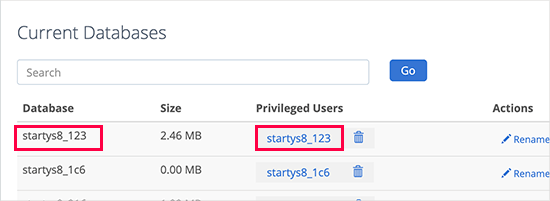
Customers are not entitled to have the required authorizations for the database; this can cause an error. Click on the blue link for the database under MySQL Manager Users > Database Gain Access to examine this. Then click on the Accessibility Management icon.

Permissions have to be readied to “All Permissions.”.

4. Repair The Database

Although the file is most likely corrupt, it deserves attempting this first as minor database mistakes are simpler to repair and much less risky. There are several methods to fix a WordPress data source. First, choose PhpMyAdmin in your cPanel, click Go to Data Source, select All Tables, and click Repair work Tables in the drop-down menu.

The 2nd method uses WordPress’s built-in data source fixing setting, which can be made possible by adding the complying with a line to your Wp-config. PHP data.

Add specify(‘ WP_ALLOW_REPAIR’, real).

After that, browse this link.

https://yourdomain.com/wp-admin/maint/repair.php.

Select the ‘Deal with’ option and wait on WordPress to refine it. This might take a while. However, it ought to solve one of the most typical database corruption issues. Then remove the line of code you included in Wp-config. PHP. Anybody can access the data source repair service link, so make sure a harmful visitor does not activate it.

5. How To Execute Caching On Your WordPress Site?

5 Best WordPress Caching Plugins to Speed Up Your Website (2022)

Typical reasons for database connection errors.

Inaccurate data source credentials. The most typical root cause of incorrectly established database links is incorrect WordPress database credentials. This can be a database name, username, or password. Remember that these qualifications vary from the credentials used to access the website.

The WordPress MySQL data source consists of a large quantity of information. If any part of it is removed or corrupted, this can cause mistakes. The data source can be corrupted if hands-on intervention is made to it, yet it can also be corrupted during everyday use. MySQL is mighty, but absolutely nothing is best, and errors can happen.

WordPress core documents are corrupted. Likewise, the core WordPress submits that compose an internet site can be damaged. These files are outside the database, yet the same mistakes can occur.

Troubles with the webserver or holding carrier. This Mistake happens when there is a problem with the host or web server, and WordPress can not query the data source. These issues consist of power failures, data loss, and equipment failings.

Although we have already specified that one of the most typical sources of the Mistake is incorrect qualifications, it can likewise be brought on by one of the complying with factors. For that reason, to solve the Mistake, you will certainly require to fix it.

6. Inspect The Database Host Info

Database Stock Photos, Royalty Free Database Images | Depositphotos

If you have inspected the database qualifications and dealt with the Error yet still obtain a mistake connecting to the database, you need to check the database host info next off.

You can find the data source hostname in Wp-config. PHP under the data source name and qualifications.

Takedown these details, and after that, go back to the DreamHost panel and navigate to Even more > MySQL Data source. The hostname in the Wp-config. PHP data should now be presented on this page. If it is disappointing, you will require to include it.

Click on the “Add New Hostname” button to add a hostname.” Enter the preferred hostname on the following web page and pick the right internet site domain from the drop-down listing.

When you have finished, click “Create this MySQL hostname currently”! It might take a couple of hours for the new hostname to appear in DNS, so stop briefly below. After a while, check that the site is working appropriately. If you are still getting database error messages, continue to the following step.

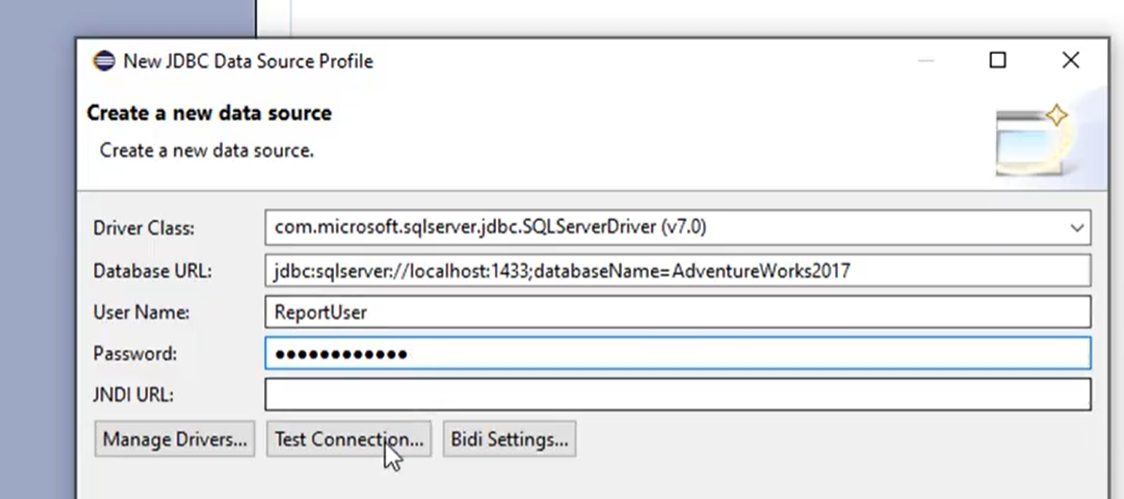
7. Create A Brand-New Database How to connect BIRT to Database — Decode Analytics

  • Level of problem. Scientific.
  • Problem.
  • Modest.

Approximated fixing time:15 -20 mins.

If all of the above techniques fall short, your data source might be corrupted entirely and no longer helpful. In this instance, you will need to develop a new MySQL database and a new user in the organizing control board.

After you create a brand-new MySQL database, restore a backup of your site to ensure that you will not lose any essential data.

  • hPanel

Users of hPanel can go to Data sources and click MySQL Databases. On top of the page, there is a tab for creating a new MySQL data source and also database customer.

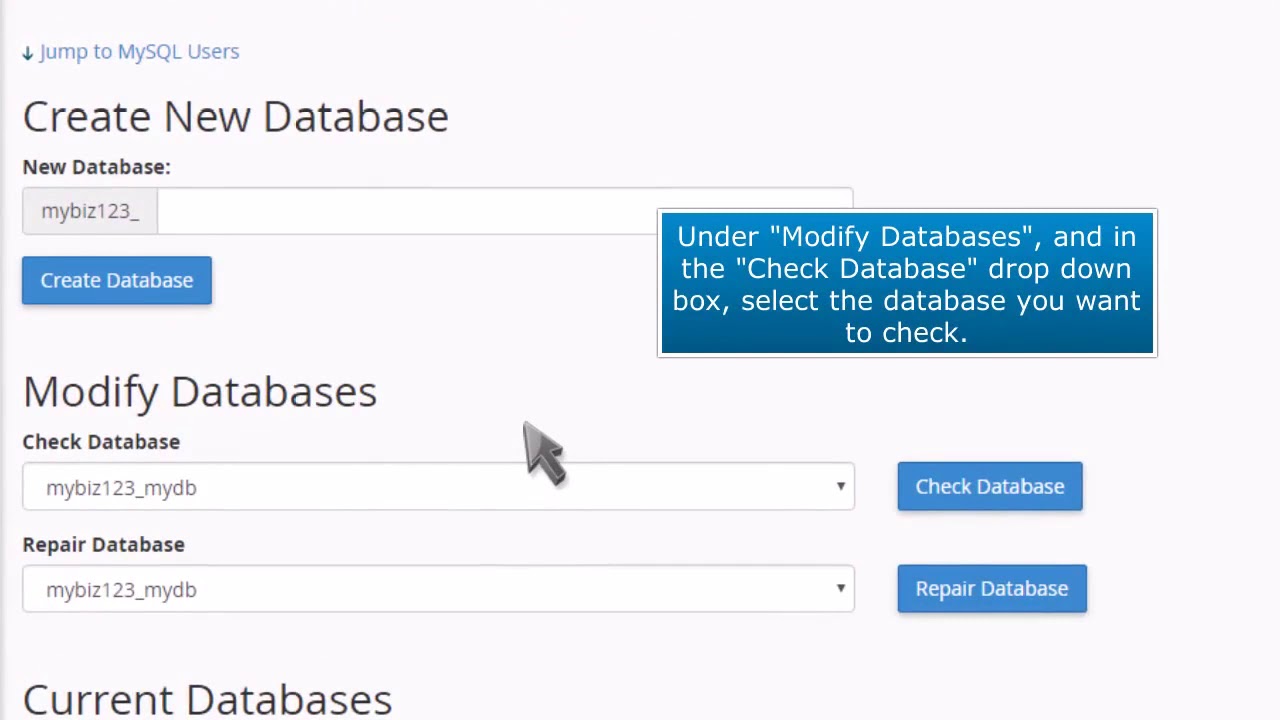
cPanel: How to Check a MySQL Database for Errors - YouTube

Enter your database name, username, and password and click the Create button. Bear in mind that the data source password has to consist of eight or more upper and reduced case personalities.

After you do this, the new data source will show up in the Existing MySQL Databases and the Users list. After that, you can manage the database and carry out numerous jobs, such as producing a backup.

  • cPanel

In the cPanel control panel, go to Databases- > MySQL Databases. At the top of the page, you will see the Create New Data Source tab. Get in the name of the brand-new data source and click Create Data source.

The system will, after that, include the brand-new data source to the checklist of existing data sources.

You can also develop a brand-new MySQL user and designate it to the brand-new database in the same home window. Relying on their privileges, individuals can do various tasks, from producing new tables to updating rows.

Enter your brand-new database username and password on the MySQL Customer tab and click Create Customer.

Once you develop a brand-new individual, scroll down to add that Individual to the brand-new database.

Backing Up Your Online WordPress Site - Some Resources - Tom Wade MD

On the Modify Data Source tab, you’ll see two choices for checking or fixing the database. To repair a damaged data source, pick the Repair service Database choice.

Wait for the procedure to complete, and after that, see the WordPress website to see if the “Error connecting to database” message still shows up.

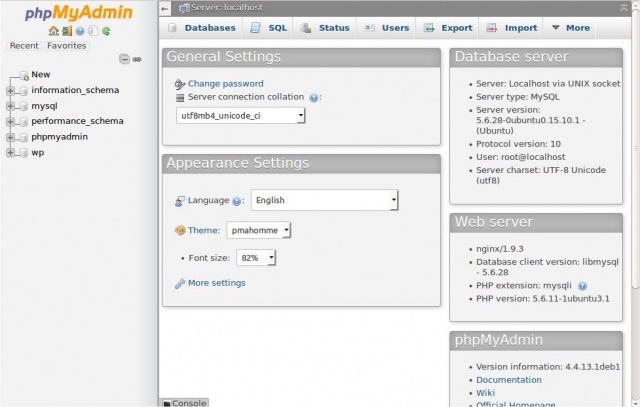
Another alternative is to deal with the database tables in phpMyAdmin. To do this, go to Databases- > phpMyAdmin, click on the name of your database and check all the tables.

  • Click on the adjacent drop-down menu next to the ‘Examine All’ switch. And select Restore Tables.
  • It will be caused to run and repair all the damaged tables. Statement REPAIR_TABLE.

My Web Maintenance

logo

Naturally, this Error is trouble for WordPress website proprietors, but we have described some quick fixes. And if that doesn’t solve your internet site issue or you need experienced aid, we’re constantly below to help.

To contact us, click on this link

  • WordPress Malware Redirect Hack.
  • How to take care of a backdoor in a compromised WordPress website?
  • How to repair the “This account is locked” Mistake in WordPress internet sites.
  • The most effective WordPress security plugins for 2022.
  • Analyzing errors. WordPress phrase structure mistakes are arbitrary.
  • WordPress hacked – How to secure your internet site in 2022 [guide]
  • 26 Best WordPress Plugins: Maximize your website speed.
  • How to eliminate pharma hacking from your WordPress site?

For more help and information please visit My Web Maintenance

Quick tips to fix the error establishing a database connection on your WordPress site Read More »