My Web Maintenance

monitoring key transactions

Migrating your WordPress website: what you need to know

Are you planning to move your WordPress website to a brand new hosting provider? Many companies are faced with the choice to migrate their website to another hoster because they have problems with their current provider, who they may be fed up with!

Of course, no one wants to worry about switching WordPress web hosts. We all want 100% uptime, great load times, and an affordable solution, all in one package.

But unfortunately, the world of WordPress hosting doesn’t work like that, and the perfect scenario is almost impossible. Suppose you are unsatisfied with your present web hosting provider. In that case, you may have already experienced some of the following five reasons why businesses migrate their WordPress website to a new host.

1. Too Much Downtime

Website Maintenance Vector Art, Icons, and Graphics for Free Download

All providers on the market guarantee 99.99% uptime. But how many of these companies can back up those words with actual uptime and peak WordPress performance?

Your website is a vital component to the success of your business, and that’s why you need a hosting service that offers stable uptime that will protect you from any loss of revenue or customers. There are several reasons why downtime can harm your bottom line:

Missed opportunities: If you’re in eCommerce, you can lose many sales opportunities, and if you’re in B2B SaaS, you lose product registrations and leads.

Damaged reputation: Downtime can easily damage your company’s reputation. First impressions count, and so do second ones. So if users want to access your website but experience downtime, that’s a big problem that could keep them away.

Wounded SEO: Depending on the duration and intervals of downtime, your SERP ranks could be affected. Repeated website downtime will give Google enough reason to push your website down in the rankings.

Consequently, anything shorter than 100% uptime means a drop in traffic and revenue. There is no room for downtime or website errors for a quality hosting provider and a reliable web experience.

2. Terrible Customer Service

Is there anything more disappointing than not being able to reach a customer service representative when you need to resolve an issue? Your business could depend on whether you can resolve the glitch, error, or problem quickly. There could be numerous difficulties if your web hosting experience is miserable. When problems occur, you require to be able to get in touch with a customer service representative right away.

Before choosing a hosting provider, you should at least check if the customer service team is up to the task! It would be best if you ensure that will solve all your problems before you decide on a provider.

To evaluate the quality of your hosting provider’s customer service, you require to analyze the following aspects:

Feedback time: How much time does the current holding company require to respond to your request? If you encounter a roadblock with your WordPress website, time is precious, and there is no excuse for not responding to your call. A fast response time is something you shouldn’t even negotiate.

Resolution time: If the hosting team are expert, the resolution time shouldn’t be more than a few minutes. Every second is crucial, and if your website doesn’t load properly, customers might churn. So, if you are stuck with a hosting company that takes too long to respond to your requests, you should cut your losses by switching to a new company.

Expertise: If you receive a quick response to your inquiry, but it’s unclear and doesn’t provide a practical option, then that response is no help! Make sure that you work with an employee trained to answer and solve any of your hosting queries.

A good hosting provider will offer you every kind of support, from a ticket system to live chat and email to phone and video calls – 24/7/365! Having multiple assistance choices at any given time can resolve critical issues quickly and with additional preventive measures.

3. Slow Loading Time

1,638 Slow Loading Photos Stock Photos, Pictures & Royalty-Free Images -  iStock

Internet sites tons time is crucial to the success of your company. A delay of just one second can cost a company. Whether you’re producing content or selling a product on your site, fast data transfer can distinguish between acquiring brand-new clients and shedding them to your competitors.

Your hosting solution can make a significant distinction when it comes to the performance of your WordPress internet site. A modern SSD drive can read data much faster than a traditional hard drive, it may be much more costly, but the efficiency is well worth it. For this reason, you should choose a robust hosting provider with the latest infrastructure and solid-state drives.

Durable WordPress organizing carriers additionally use VPS environments or cloud networks to dedicate more resources to each client, resulting in faster loading of pages and databases. If the hosting infrastructure is designed for speed, the provider should make extra efforts to optimize the speed of your website additionally.

Caching helps your website deliver content faster while reducing the load on the web servers. A powerful hoster will offer you a caching system with plugins and add-ons for your static files and databases.

4. Poor Security

2,044 Health Data Protection Stock Photos, Pictures & Royalty-Free Images -  iStock

Today’s technology has changed every industry, and one of the most significant issues is cybersecurity. Suppose you have a WordPress website that is not adequately secured. In that case, you are in for an absolute nightmare with stolen datawebsite glitches, and other malicious intentions that could harm your business.

Your WordPress web hosting plays a significant role in your WordPress website’s safetysecurity, and upkeep. The wrong host selection will result in inadequate protection of your build and all other websites hosted on the same server.

Despite WordPress’ robust core, you may need additional layers of protection for your website.

One of the essential steps for better WordPress security is automatically updating the corethemes, and plugins, which is, fortunately, an option in almost every hosting plan.

Suppose you’re working with a professional WordPress development agency. In that case, your development team will most likely provide an additional layer of monitoring to ensure that automatic updates don’t override any site features.

Other useful features for online security are automatic backups and SSL certificatesSSL certificates are crucial because they can encrypt communications between servers and browsers. Furthermore, SSL certifications gradually contribute to your search engine position, improving your position in SERPs.

Besides automatic updates and SSL certificates, an excellent hosting plan includes regular scans and solutions for malware and viruses, web firewalls, and protection against DDoS attacks.

5. Missing Features

Missing Vector Art, Icons, and Graphics for Free Download

The host is a service that you have to pay for. So, to make an informed decision, you need to understand the features that each hosting package offers you and the impact that these features will have on your WordPress website.

It’s great to have all the essential features for your hosting package, but wouldn’t you like to get more for your money? There are features that you may have to do without, such as:

Great server location: Server place is just one of the most critical elements that affect the speed of your WordPress website. Usually, a website will load faster if accessed from a geographically close location to the server location.

A plethora of useful plugins: Do not look for a more significant number of plugins – seek plugins that you can benefit from! Ensure that your organizing service offers you plugins that increase your website’s security, improve your search engine optimization and simplify the monitoring and maintenance process.

Performance-oriented architecture: You deserve nothing less than breakneck speed and performance for your WordPress website! It would be best to have a web host that guarantees optimal use of modern technologies for maximum speed and efficiencies, such as NginxMariaDBPHP7LXD containers, and a minimalist hosting stack customized for WordPress.

Sandbox setting: With the sandbox or hosting a setting, screening and optimizing an improved variation of your WordPress website is a much more effective process, ensuring no downtime or other inconveniences on your live site. The sandbox must provide access to an SSH connection, at least SFTP, the database, and other files. If you run into problems, you have the time to fix them or find alternative solutions.

Server Space: Your current hosting plan may have worked well initially, but as your traffic increases, you will need to switch to a hosting plan with enough server space to support this growth. So, when comparing different hosting plans, you should choose one that offers the most storage space at the most affordable price.

Payment plans: With web hosting, you usually get what you pay for, but sometimes a comprehensive plan isn’t even necessary. How can you tell if you’re paying excessively? If your plan has many features, some of which you never use, or your website is still small, but you’re hosting it on a server with more storage than you need, you should reconsider your options.

The bottom line is that you must never settle for the cheapest solution for WordPress hosting. Check thoroughly what features are offered and if the company provides you actual advantages over other hosting providers.

Choosing A Managed Hosting Provider 5 Best Managed WordPress Hosting in 2022 Compared (Pros & Cons)
Once you have selected the attributes you need, you should choose a new hosting partner for your WordPress website that can handle heavy traffic, withstand security attacks, and provide an excellent foundation for your content.

A managed hosting service monitors and maintained every technical aspect of your WordPress websiteThe number of websites that have switched to managed hosting has increased over the past 8-9 years, and along with WordPress websites, this is the predominant way to manage businesses online.

The Top Four Advantages Of Using A Managed Hosting Provider Are

Better website security: Managed-to-host services offer unparalleled security compared to other types of WordPress web hosting. A managed provider offers the highest level of security, daily backups, malware scans, and updates that prevent hacker attacks on your website.

Uptime monitoring: Speed and performance directly impact search result rankings. Most managed-to-host providers offer 24/7 website monitoring, so you don’t have to worry about your website’s performance at any point in time.

24/7 support: Managed hosting providers have trained experts who know the technical details of the platform and how to solve common and complex problems.

Customizable solutions: Most managed hosts can support almost any niche, from educational blogs to e-commerce websites and everything in between. Will certainly customize the option to fit your company’s needs, not the other way around.

If you pay a bit more for a high-quality hosting provider, you will get additional security layers, 24/7 support, and regular malware scans. A top-notch hosting plan also includes top-notch caching plugins and CDN access, measures that can significantly impact the speed of your website.

At My Web Maintenance, We’re passionate about WordPress website design, hosting, and maintenance. We offer website design, web hosting, and maintenance solutions for your business to help grow your online presence.

Migrating your WordPress website: what you need to know Read More »

Web Efficiency Monitoring – Definition, Tips, and Top Web Monitoring Tools

Today, many businesses have a significant digital footprint, and some rely heavily on their web applications to deliver value to their customers and generate revenue. In this competitive digital environment, it’s not enough to make sure your website is available 24/7. It would be best to optimize your websites regularly to provide a better experience. Slow pages or pages that are not optimized for mobile devices can increase bounce rates and impact your search engine rankings. This article will teach you how to monitor your website’s performance and speed up with the best web performance monitoring methods and tools.

WHAT IS WEB PERFORMANCE MONITORING?

Web performance monitoring refers to practices and tools that allow you to monitor your web application based on various metrics and technical parameters that affect page load speed and customer experience. Most web performance analyzers assist you in checking website status or uptime and track critical indicators such as page size, time to the first byte, broken links, database performance, CPU usage, etc. By regularly monitoring your web applications, you can identify lingering, hidden or cyclical issues and better prepare for unexpected spikes.

Web performance monitoring devices can also help you improve your web pages’ “perceived performance,” making them appear to load faster than they are. “Lazy loading” (the gradual loading of images or other elements as the user scrolls down a page, rather than loading the entire page at once), used on modern, image-heavy websites, is an excellent example of optimizing perceived performance. Modern web performance monitors also assist you in tracking user experience or UX-related cues, such as page load spinners, click and hover interactions, animations, scrolling, etc.

HOW FAST SHOULD YOUR WEBSITE LOAD?

When it comes to page load speed, several reports and guides, including this one from Google, recommend optimizing pages for mobile devices as a high priority. According to Backlinko, which gives one of the most up-to-date statistics, the average loading time of a website on mobile is 87% higher than on desktop. It also states that.

The average loading speed (fully loaded) of a web page is 10.3 seconds on desktop and 27.3 seconds on mobile.”

The other essential signs measured by Backlinko are as follows:

  • TTFB (Time to First Byte): 1.2 secs (desktop computer) and also 2.594 seconds (mobile).
  • Rate Index: 4.782 seconds (desktop) and 11.455 seconds (mobile).

It should be noted that the overall size of the page has a significant impact on the loading speed. It would be best to consider compressing images and text to reduce the page size using Gzip.

THE MAIN FACTORS AFFECTING WEB PERFORMANCE

Server performance

The performance of a web server directly affects the performance of your website. Whenever a browser pings your server, it asks the server to load or transmit data to your website. If your server is unhealthy, it will take longer to process these requests. In many cases, your hosting provider is responsible for server maintenance. If your website uses shared hosting and regularly struggles with resource issues, you should consider switching ISPs or choosing a higher plan with more CPU, RAM, and storage space. If you host your website yourself, you can check out this guide to web server monitoring.

Server location

Businesses spread across multiple locations need to ensure that their website performance remains consistent. However, if your site is hosted in one region (e.g., California) but receives traffic from other regions (e.g., Europe), the user experience will differ. In other words, the same page may load faster in the US than in Europe. You can consider implementing a CDN (content delivery network) in such cases. A CDN is a network of added server nodes distributed worldwide to provide faster response times and lower latency. These nodes typically cache static content from your website, including CSS and Javascript files, images, and other components.

Site size

The widespread availability of high-speed broadband and 4G mobile networks has enabled businesses to provide a better experience for their customers with rich multimedia content. Most customer-facing websites today contain high-resolution images.

As a result, the standard physical size of web pages has also risen. However, the increasing weight of pages can take longer to load. All images and components must be optimized or compressed wherever possible to ensure that your web pages load faster. Besides compression, there are other techniques to optimize page size. For example, you can use any streaming service instead of hosting video content on your servers.

Scripting or code-related issues

As websites develop, code density and complexity also increase. Every primary website is built with thousands of CSS, HTML, and JavaScript code lines. Often, multiple scripts are executed in parallel. In such situations, unexpectedly large numbers of web server calls can lead to increased latency. In addition, multiple threads accessing the same shared code or files can lead to “race conditions” that can leave a website vulnerable to security threats.

If the third-party service is down or more heavily loaded, processing your site’s requests will take longer. In many cases, third-party scripts can also affect your site’s performance because calling a remote server to run or load a script takes extra time. By following application development best practices (e.g., minifying JavaScript, CSS, and HTML files, browser caching, etc.) and ensuring that all scripts are appropriately optimized for speed and security, you can avoid such issues.

Faulty CMS plugins

One of the advantages of using content management systems (CMS) is that they offer numerous plugins that keep your development teams from reinventing the wheel. While these plugins save a lot of coding time and effort, they can also introduce performance and integration issues. Plugins developed with older technologies or inefficient database queries can lead to higher load times. In addition, free plugins are rarely updated and may have unpatched security vulnerabilities. Development groups should consider limiting the use of plugins as much as possible.

WHAT MAKES MONITORING WEB PERFORMANCE DIFFICULT?


Complex web architectures

It means that modern application architectures are significantly different from earlier times. Most enterprises are reshaping their traditional LAMP and MEAN stacks to leverage microservices and containers. These applications require analysis of a large amount of data from multiple sources for troubleshooting. Traditional web monitoring tools for availability and performance are not equipped to handle this complexity.

Lack of proactivity

Another major challenge most organizations face is that their teams often become accustomed to traditional processes and tools that provide a reactive method for web performance management. In other words, teams are prepared to respond to a problem but lack the tools and strategy to predict and prevent such problems from occurring.

Lack of intelligent alerting

Alerting fatigue” is no stranger to IT administrators in large enterprises. Most traditional tools require a lot of time and effort to define baselines or understand how their site behaves in different situations. Even when alerts are configured accurately, problems can often go undetected because they fall below certain thresholds.

5 BEST PRACTICES FOR MONITORING WEB PERFORMANCE

  • Monitoring website uptime statistics
  • Monitoring errors
  • Monitoring key transactions
  • Monitoring application dependency
  • Monitoring metrics using the RED method

1. Monitoring website uptime statistics

Best Website Monitoring Services You Should Consider Using

One of the first things you require to check is whether or not your website is online and available to your users. One way to check the website status is to use an HTTP ping monitor that pings your website in specific periods. As long as you get the 200 response code, you can ensure that the website is available. You can also analyze the ping response times to detect any problems or spikes.


2. Error monitoring

67 Error Page Binary Stock Photos, Pictures & Royalty-Free Images - iStock

Whenever your application encounters problems, it generates errors. here are five categories of HTTP error codes (identified by the first digit of the code):

  • 1xx: Informative
  • 2xx: Success
  • 3xx: Redirection
  • 4xx: Client error
  • 5xx: Server error

HTTP error 500, one of the most common errors, indicates that a web server has internal problems that cause errors when processing requests. It doesn’t say much, but if the error code keeps appearing, you should look at troubleshooting.

3. Monitoring key transactions

Specific web requests or transactions can be critical to your business operations. These requests vary depending on the type of web application. For example, an e-commerce application is significantly different from a banking application. Accordingly, the services, APIs, and plugins used for these transactions are also different. You require to identify these critical transactions and monitor them effectively.

You can monitor genuine user transactions with statistics showing the percentage of successful transactions and the time to complete them. If you see a sudden drop in the success rate, you can conclude that there may be a problem. Error logs let you determine the exact nature of the error. You can also monitor transactions synthetically by using servers to simulate real-world conditions. This approach is helpful for proactive planning and problem resolution.

4. Monitor application dependency

Computer Application Vector Art, Icons, and Graphics for Free Download

As organizations introduce more and more new features for their web applications, monitoring their performance in the live environment is essential. Application dependency issues often arise when applications are moved from the production and test environment to the production environment. Modern tools that support “distributed tracing” can help you identify the root cause of such issues in a microservices environment.

5. Monitoring metrics using the RED method

The RED Method: key metrics for microservices architecture

Several tools provide out-of-the-box web performance metrics. In addition, teams add their metrics. In principle, all these metrics must help them overview the entire environment by providing an aggregated view of their environment. However, this technique can also lead to information overload. They need to shortlist some critical metrics to assess the usability and health of the application quickly.

RED Metrics is a widely accepted technique for monitoring the three most crucial web performance metrics:

  • Rate – requests offered by the application per second.
  • Errors – the percentage of requests in which an error occurs
  • Duration – time is taken to complete a request.

You may still require additional metrics from databases, external APIs, and other deeper analysis and troubleshooting sources. Nevertheless, if your application is running well, you don’t need to monitor all of these metrics all the time.

THE 8 BEST TOOLS FOR MONITORING WEB PERFORMANCE

  • GTmetrix
  • WebPageTest
  • SolarWinds Pingdom
  • PageSpeed Insights
  • Uptrends
  • Dotcom Monitoring
  • Site24x7
  • Uptime Robot

1. GTmetrix

GTmetrix is among the most popular commercial devices for monitoring website performance. It provides a wide range of features for detailed testing and analysis of a web application.

You can get a free performance report for your website to quickly assess how GTmetrix can help you measure your web performance. As you can see in the screenshot above, key indicators such as PageSpeed scores (Google), YSlow scores (Yahoo), full load time, and total page size are displayed upfront. These scores are calculated based on more than 25 servers in seven regions worldwide, which can help you better assess the user experience in the target regions.

You can also obtain a detailed and in-depth overview of resource usage and monitor metrics like TTFB, First Paint, RUM (Real User Monitoring) Speed Index, etc., with various charts and visualizations. Another exciting feature is the page loading video, which can help you accurately identify problems from the user’s point of view. The only downside of this tool is that it can be a bit daunting for first-time users, as it is not easy to identify the most critical parameters for monitoring a website’s performance.

2. WebPageTest

If you are searching for a free tool to measure website performance, you can try WebPageTest. Since it is an open-source tool, it is one of the most customizable web monitoring tools. Although it is a free tool, it offers options to select different browsers and server locations to get detailed insights into the user experience.

The tool takes a bit more time to run tests, but it provides you with enough options to identify issues that affect your website’s speed accurately. It also provides waterfall charts that allow you to monitor the time taken for each request in a visual way. A simple rule of thumb for analyzing waterfall charts is to check their width; a more comprehensive chart indicates a slower loading website. Moreover, you can also create custom metrics according to your monitoring needs.

3. SolarWinds Pingdom

SolarWinds® Pingdom® is another powerful tool that provides a much simpler yet practical and faster evaluation of your website. It monitors website uptime statistics, page speed, transactions, and actual users (RUM) with servers in more than 100 locations worldwide. The tool also supports synthetic monitoring. With Pingdom Website Speed Test, you can perform a free website test.

It will give you a quick summary of the test results with recommendations on improving page performance. You also get a tabular summary of response codes, content size by content type/domain, and content type/domain requests. You can also examine file requests by load, order, wait, DNS, status code, and other options.

Pingdom’s main advantages are its intuitive user interface, making it easy for new users to get the most out of the tool. It’s easy to set up email/SMS notifications with Pingdom, and it also integrates seamlessly with notification services like Slack and Pagerduty. You can also install the Pingdom mobile app, which connects to the uptime monitoring service and helps you monitor your site’s uptime on the go. 


4. PageSpeed Insights

PageSpeed Insights from Google can be an effective tool for monitoring your website’s performance. However, teams mostly prefer it focusing on search engine optimization (SEO). When you run a test, you’ll get a concise summary of various parameters with options to drill into the topics that interest you.

You can examine various on-page and back-end elements of your web application and check how they affect loading speed and response times. The tool helps you monitor the quality of various primary components and provides recommendations on how to optimize different elements. The tool is ideal for tech-savvy marketing teams and even helps developers get familiar with Google’s web guidelines and recommendations.

5. Uptrends

Uptrends is a developed player in the web monitoring space. It offers a very intuitive dashboard to track various load times, errors, metrics, and waterfall graphs. You can run tests with multiple browsers from more than 200 sites worldwide.

The tool also lets you test website performance on mobile devices. The bandwidth throttling feature simulates slower mobile networks (2G, 3G, etc.) to test how your website performs under such conditions. However, to monitor transactions and APIs and enable multi-browser testing, you need to sign up for a Business or Enterprise subscription. Accurate user monitoring is also limited until you subscribe to more expensive plans.

6. Dotcom monitor

Dotcom-Monitor offers comprehensive web performance monitoring features, including availability tests, transaction monitoring, performance metrics, alerts, event logs, and mail server monitoring. These features can help you get a detailed insight into each user’s web journey and ensure a better experience with continuous optimizations.

Like other advanced commercial devices, it also offers waterfall graphs and video playbacks to monitor different loading times and browsing patterns. The tool also provides a wide range of integrations to help you get the most out of your existing operational setup. A significant highlight of the product is the historical trend analysis and reporting feature, which permits you to predict future performance results based on key metrics.

7. Site24x7

Site24x7 is another effective website performance monitoring solution that offers famous and advanced features such as website defacement monitoring, SOAP web services, REST APIs, etc. With this service, you can obtain a detailed view of website uptime statistics and the performance of your web applications using test servers spread across more than 90 locations worldwide.

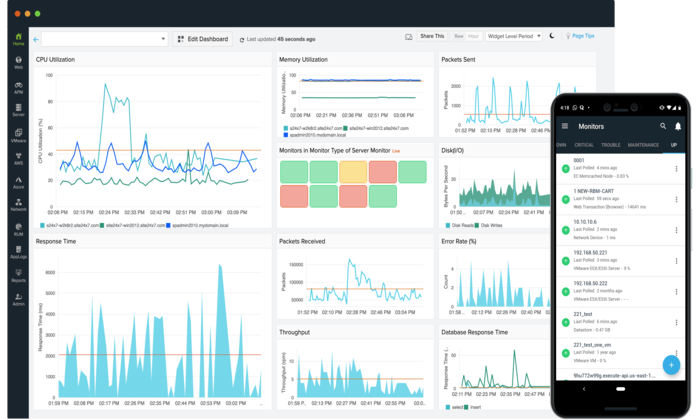
You can also track essential performance metrics with user-friendly dashboards and receive timely alerts to respond to and troubleshoot issues in real-time quickly. While the solution is suitable for end-to-end monitoring, the initial setup can be challenging, and fine-tuning alerts and notifications requires significant effort.

8. Uptime Robot

Uptime Robot is a simple website status checking tool. With the paid version of this device, you can automatically ping your website every minute to check the status of your website. If you receive a 200 response code, your website is available. In case of an error code, the tool performs several checks and finally triggers an alert.

You can get these alerts via SMS, email, or other services like Slack, Telegram, etc. Unlike other devices mentioned in this article, it does not offer recommendations or other advanced options for troubleshooting web performance issues. However, the accessible version of this tool can be a perfect option for smaller organizations that need a simple tool to monitor website uptime.

This article explains that website performance can be affected by various factors, including numerous components such as images, CSS, JavaScript, underlying hardware, and network issues. Modern web monitoring tools can assist you in tracking various metrics and performance indicators to stay on top of your website’s performance. 

Enjoy the post? For more posts, please visit My Web Maintenance

Web Efficiency Monitoring – Definition, Tips, and Top Web Monitoring Tools Read More »